My Success Story- why I’m so passionate about showing you how to start a lifestyle blog.
Blogging began as a hobby and has transformed into so much more than that for me. For more than 13 years, I’ve been able to come here, share bits about my life and connect with so many others! I started out sharing mainly my life, then incorporated fashion, then pregnancy, motherhood and parenting. Essentially, the blog has grown with me!
That’s the biggest reason that I want to show others how to start a lifestyle blog. It has opened so many doors and presented many opportunities that wouldn’t have been there without this blog of mine. Blogging has allowed me to do what I love and to stay at home with my babies. It has allowed me to create my own schedule and express myself in ways I never knew were possible before.
I had no idea at the time, but blogging has now set me up to be able to homeschool my kids, which I am so thankful for!
I know what you’re thinking- “I don’t know how to start a lifestyle blog” and “it just seems so hard to do” or “it’s too late to start a blog”- well I’m here to show you that a blog can be created easily by just following a few steps! And starting is the KEY to blogging! I had no plan when I started, other than to just share my life.
How to Start a Lifestyle Blog
1: Choose Your Blog’s Topic
2: Choose Your Platform
3: Get URL and Domain
4: Get Hosting
5: Install WordPress
6: Install a Theme
7: Publish Your First Post
What is a lifestyle blog?
A lifestyle blog is simply a blog where you write about things going on in your life! It can be very general, or can focus on one aspect of your life (like motherhood or fashion) with some other content mixed in every now and then. It’s really a wide-open option, which is why I recommend it!
You can start a blog related to anything though! Some of the most popular blogging categories are: food, lifestyle, parenting, fitness and finance.
This step-by-step tutorial will show you how to launch your own blog.
I created this one-page PDF printable with an 8-week launch checklist. If you do everything on this checklist, you’ll be well on your way to your first profitable month!
Before We Begin: Why create a lifestyle blog?
There are so many great reasons to start a blog today! Let’s talk about the obvious one first – money. Yes, you can earn money blogging. Within just a couple of years, I was making a notable income from the blog, after about 5 years I was making a full-time income and was able to leave my job! The good news for you, is that it’s easier to build a blog FAST in today’s world. I didn’t have Instagram, or even really Facebook at the time I started. Now, you have so many avenues to build a blog audience quickly! The best part is that because I make a living from my blog, I am able to stay home with my babies and work from here!
Don’t let anyone try and tell you blogging is an easy, get rich quick thing. It takes a LOT of work, but I still believe it is one of the BEST businesses a stay-at-home-mom, student (or anyone!) can start because of the LOW startup cost and unlimited potential.
I’ve been able to live a life I only dreamt about when I was waiting tables at a restaurant 12 years ago. I am able to wake up every day and do exactly what I want to do!
So, are you ready to start your blogging journey?
Print this pdf checklist to help make sure you complete all of the steps!
Step 1: choose your blog topic
What are you interested in?
Blogging about what interests you is very important. If you like the topic, and are interested in what you’re writing about, your readers will pick up on that. You’ll also enjoy doing it more and that is especially important if you’re going to stick with it.
Even if you’re blogging as a business, it should still be fun and something that you enjoy. If you start out writing for the sole purpose of making money, people will see straight through that.
What are you good at?
If you have a particular skill that you think should be shared with the world, a blog is the perfect place to do it! Do you excel in the kitchen? Start a food blog! Are your friends always asking you for fashion advice? Perhaps fashion blogging is the way to go.
If you can offer tips and generally help people out, they will flock to your blog.
Step 2: choose the proper platform
WordPress all the way
I won’t even discuss other options because I am so passionate about WordPress as a blogging platform. Here are a few reasons why WordPress is the best platform for blogging:
- Great for beginners
- Tons of free themes available
- Easily customizable, even if you have no coding knowledge
- There are tons of free plugins that make just about everything easier
- WordPress is the most commonly used platform, and therefore there are tons of resources out there providing help, should you get stuck
Why not a free platform?
There are many reasons why you should avoid using a free platform for your blog. Among them are:
- Some free platforms put their own ads on your site
- Most free platforms restrict your ability to put ads on your site or make any money at all
- There is virtually no support available and even something as simple as a design change warrants a cost (thus becoming not free)
- You will have an ugly URL, such as www.yourblog.blogspot.com
- Most importantly, you don’t own your blog when it’s on a free platform – it’s literally like building your house on land that you don’t own
Let me address that last point again. If your blog is on a free platform, you do not own the blog, or the URL. This means (and it has happened before) that your blog could be shut down at the drop of a hat, for any reason they see fit. Some blogs have been shut down because the blogger was working with a company that the platform owners don’t like. You don’t want to put your blog in someone else’s hands just to save five bucks a month.
Step 3: snag your URL or domain name
If you already have a domain name, click this page to see how to get HostGator hosting set up for your existing domain.
Ok, now that you’ve got your blog topic and are ready to set up your WordPress blog, it’s time to get a domain name. This will be your website’s address, or what goes here: www.YOURSITE.com.
Tips on choosing a domain name:
- Make it as short as you can. The shorter it is, the easier it is for people to remember and type.
- Make sure it conveys your blog’s message. While trying to keep it short, be sure to include something about yourself or your blog’s message in the URL.
- Don’t steal. It’s best not to copy someone else’s idea when it comes to your blog. I also don’t recommend using brand names in your URL.
Step 4: Get hosting
It’s time to click right here to head over to HostGator to get your domain and hosting.
I am a HostGator affiliate and get a commission when you use my links to save up to an extra 60% off your plan. I could be an affiliate for any company, but I choose HostGator due to their incredibly low costs and awesome 24/7 customer support. Their one-click WordPress install is perfect for people who are starting new blogs.
When you use the exclusive links on this post, plans start at under $5/month $3/month!
Note – I have an exclusive 40% off code up to 60% off deal for HostGator plans. Normal affiliates get a 25% off code to offer their readers, but I asked for more and you get to reap the benefits!
Choose a plan and you’ll be at this screen:
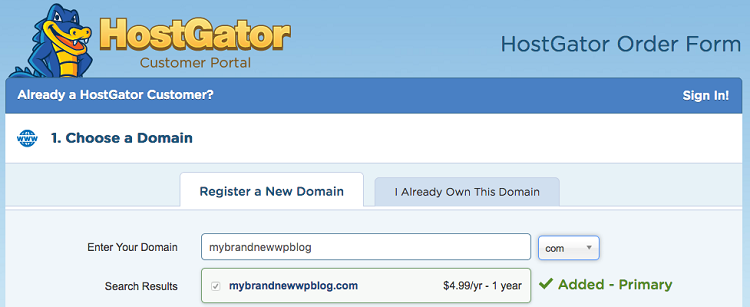
Next, you’ll enter the domain name aka your blog’s web address. The first couple you enter might already be taken. Don’t get discouraged! There are still great, unclaimed domain names out there!
Upon entering an available domain, you will see that it is available and it will be automatically added to your cart (as shown above).
You will then be given the option to add the .net and .org versions of your domain. I generally do not do this and only buy the .com domain.
You’ll also see a checkbox for “Domain Privacy Protection”. You want to keep this checked. It’s $10/year, but it prevents your registration information from being public information. This keeps your email address, phone number and even physical address from being public information. Instead, they will see HostGator’s company information.
Scroll down a bit to see this screen:
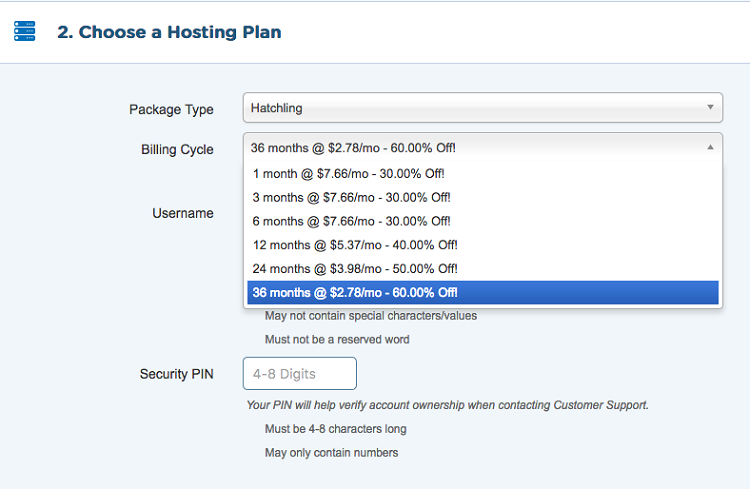
Confirm your hosting package and billing cycle length and then create an account username and password.
After that, scroll down and enter your billing info. Their site is 100% secure.
Note: if at any point during this process you get stuck, feel free to contact me (info at the bottom of post) or jump on the phone and call HostGator at 1-866-96-GATOR or click the “live chat” button in the top right portion of their page and they’ll be happy to help you out.
Scroll down a bit more for some extra options. You don’t NEED any of these, as they can all be achieved outside of HostGator. For example, there are plugins to back up your blog and to improve security. Basically, I’d take note as to what these add-ons do and look for ways to do them yourself. It’s cheaper and more effective.
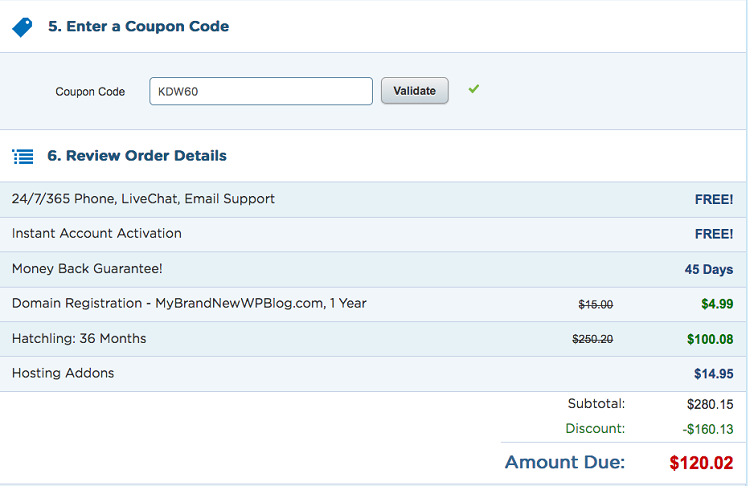
If you used any of the links in this post, the next section will have code KDW60 already entered to get your 60% discount!
Underneath of that, you’ll be able to review your order. It will look something like this:
 Check the box that you agree to their terms, move forward and complete your payment.
Whew!
Step 5: install WordPress
Once payment is complete, you’ll receive an email within a few minutes confirming your purchase and containing important information. I recommend forwarding this email to another email address that you own so it is in two places just in case.
Note: check your spam folder for the next couple of days to make sure nothing lands there. I am hearing that the email from LaunchPad (who HostGator uses to register your domain name) is ending up in spam folders. You’ll want that email to finalize your registration!
In the email will be a link to your control panel aka cpanel. You’re going to want to click that. You’ll have to login. The login and password will be in the email as well.
Now that you’re past that screen, you should get to your cPanel. This is the “back end” of your site and where all of the key technical matters will take place. It will look like this:
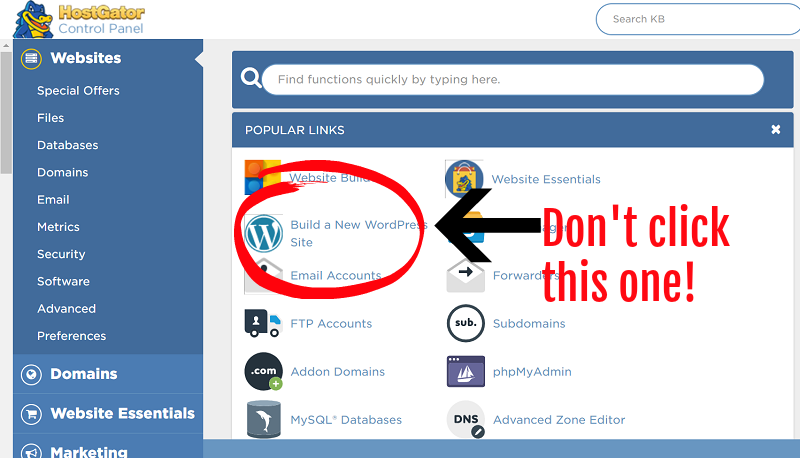
DON’T click the Build a New WordPress Site icon! We’re going to Install WordPress from a different location.
In the cpanel, you’ll see a LOT of icons. Ignore them all for now. You don’t want to spend a lot of time here unless you really know what you are doing. What we will do here is install WordPress. With HostGator, it is actually very easy to install WordPress on a domain. In your cPanel, scroll down and look for a “Software/Services” section. It’ll look like this:
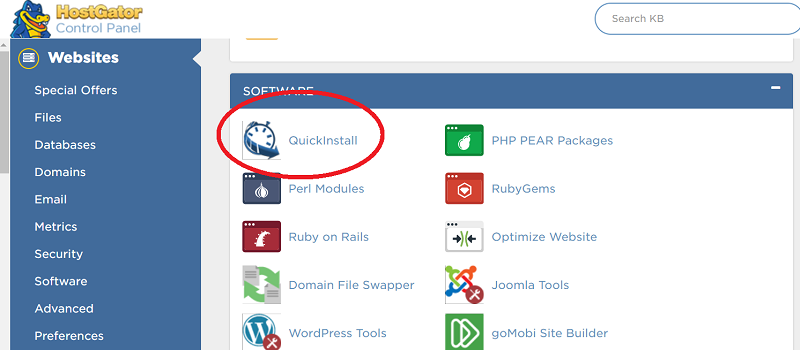
Click QuickInstall to move forward.
Then choose WordPress:
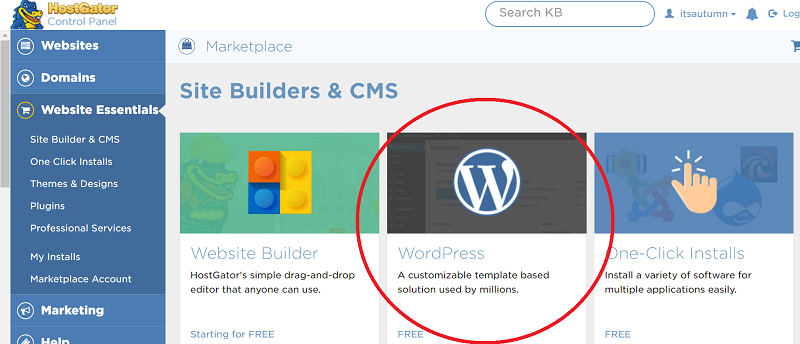
Choose your domain from the dropdown and leave the directory box blank:
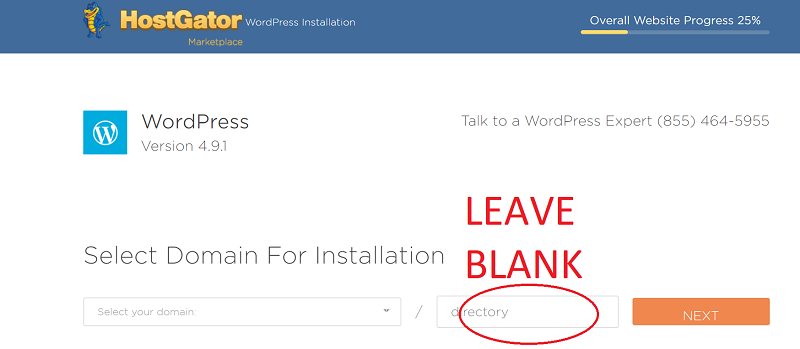
Next, you’ll be at the WordPress install screen.
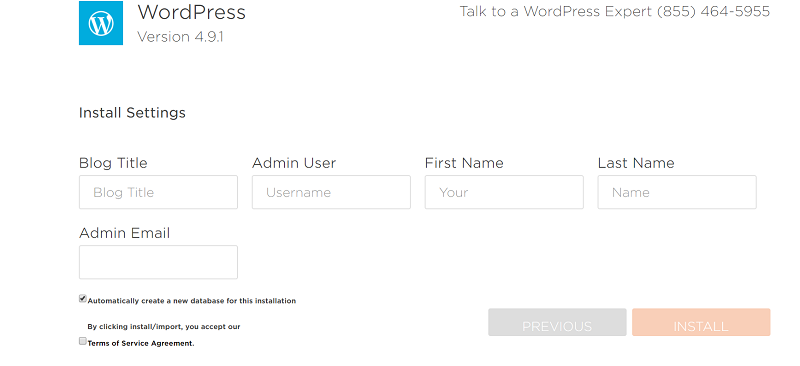
Fill out the boxes on that next screen and click install. Install will take a couple of minutes and then you’ll see this screen:
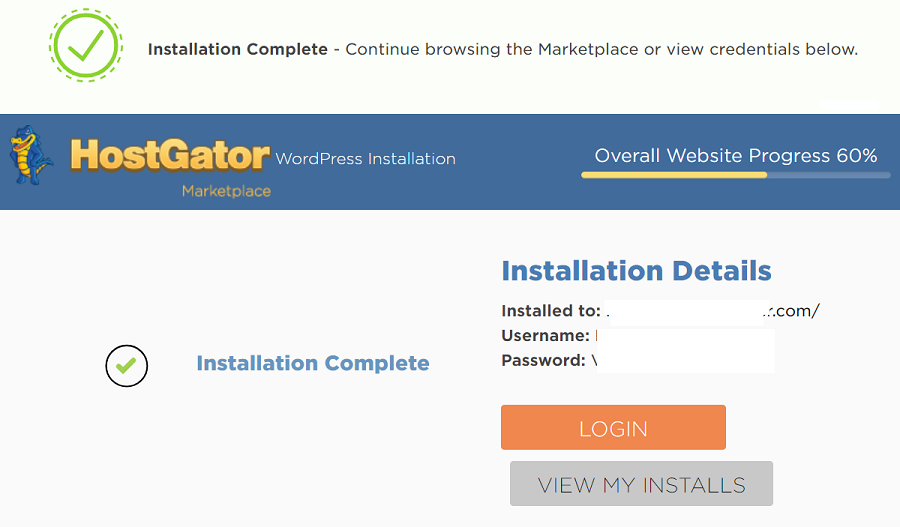
From there, copy your password and click “login” use your username and password from the previous screen and login!
Note: While most blogs will be able to be accessed right away, this process could take up to 48 hours. A very few amount of blogs will have to wait up to 48 hours, due to their location in comparison to the HostGator data servers. Feel free to use the HostGator chat support found right on their site to ask them for updates on this process.
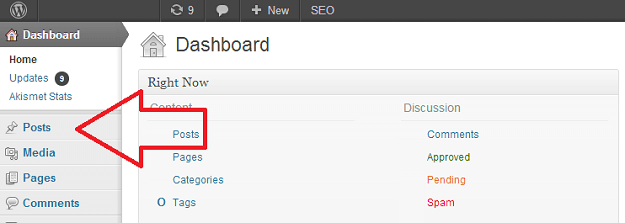
This is what your WordPress dashboard will look like:
Aaaaaaand that is how to start a lifestyle blog that is self-hosted on WordPress.
Whew! We made it! Was it easy? Do you have questions? Leave a comment below, email me [email protected] or catch me on Twitter @RealZackReyes. I’m happy to walk you through this process!
Step 6: find a theme that you like
At this point, you might want to take a look at our How to Set Up a WordPress Blog course here.
Hold your mouse over “Appearance” and click “Themes” to browse the hundreds of free WordPress themes available.
Look for a theme toward the top (probably the top 20 or so) of the “popular” themes section. You’ll find that by hovering on “appearance” then clicking “themes” then click “add new” and you’ll see the top themes.
The free themes have gotten really good and you should be comfortable picking one of those to get you started.
Step 7: publish your first post
When you’re ready to post, hover over the “Posts” option and a new dropdown menu will appear. Click New Post and you’re off and running! Congratulations- you have just started your own lifestyle blog!
To delete the original post that they put there, click all posts and you’ll see an option to trash that “Hello World” post.
Visit MoreFromYourBlog.com for tips on gaining traffic, increasing your social media following, making money from your blog and much, much more.
———————————————————————————
Tips for Blogging Success
-Write about what you love. What are you passionate about? What makes you excited and really makes you you? If you write about things that you truly love, chances are your writing will be better and others will love reading it!
-Be consistent. Whether you’re blogging once a day or once a week, consistency is key!
-Be ethical. Disclose properly for products and payments received in return for posts, and also don’t plagiarize or steal ideas and images.
-Make your blog beautiful! Spend time (or money) making the small design details of your blog perfect for you!
-Be active on social media. Don’t automate all of your accounts. Rather, be present on each platform that you’re trying to build. People like you for you and your personality should sine through!
-Take pride in the pictures that you put on your blog. This is all yours- own it!
-Steer clear of any blog drama! It is not worth your time. If you don’t have anything nice to say, just don’t say anything at all!
-Most importantly: HAVE FUN! If you’re not enjoying what you are doing, you are more likely to give up. Plus, it will come through in your content, and others will be able to tell that you aren’t enjoying it, too.
To give you an idea of lifestyle blog content, some of my favorite posts are about my daughter turning one, what I did on a recent weekend and a list of things that make me happy. You see, lifestyle blogging truly can simply be all about you and your life! Document it all on a blog and see where it takes you!
Now go on with your blog self! ;)
Did you have any questions on how to start a lifestyle blog? Comment below and I’ll try and answer!
xo

Thanks for the information regarding starting a blog. I am new to blogging so I am trying to soak up as much information as I can. Your information was very helpful and consistent with what I have been reading. What I love most about what you said is HAVE FUN! It’s easy to get bogged down with it but keeping in mind why you started it in the first place is great motivation to keep it going!
Awww I love everything you said!! So glad you found this helpful, and also love that you agree that the most important part, and the one to always remember, is to just have fun and enjoy it. :) Not hard to do, I promise! ;)
xo
This post was super helpful; I just wish I’d come accross it before I started my blog! Do you have any advice for transferring over from a blog I already have? Like if I want to make the transition from a free platform to a hosted one? Thank you!
Hi Christi! Here’s a tutorial provided by Hostgator that should make it fairly easy to transfer: http://support.hostgator.com/articles/hosting-guide/website-transfers/how-can-i-transfer-my-blogger-site-to-hostgator-hosting
If you do go this route, don’t forget to use code KATIEDIDWHAT to save 25% on your hosting! :) Good luck with everything and I think you’ll be very happy with the switch!
xo
I love this! I have been wanting to start blogging, but I wasn’t really sure about what. As a photographer, I love taking images but the texts really got me. Ive been admiring other peoples blogs forever – thank you for giving me the confidence in blogging more!
Love, Johanna Fayetteville, North Carolina Photographer
That is so awesome, Johanna! I’m glad this gave you the boost and confidence you needed! Good luck with everything. :)
xo
Thank you, Thank you, Thank you! It would have taken me hours, maybe days to figure this out on my own!
Yayyy, Joanie, I’m so glad to hear that! Welcome to blogging- it’s so much fun! :)
xo
quick dumb question – after downloading it all through hostgator how do i sign into my wordpress page?
I go to the blog but when I try to log in none of the hostgator passwords are working???
Sometimes it takes a few hours to fully activate. They have a great customer service chat feature, and they should be able to figure it out for you by looking at your account!
Thank you for the great tips on how to start you’re blog. I have my own blog and still found your info very useful, esp the part of how to upload your blog. As I actually paid a company to upload mine :)
http://www.mrsbxplainsitall.com/
Thank you so much for sharing such a great blog. Hope this is very useful for me..
Hi Katie! Thanks for posting such an informative blog post. My bestie and I just decided to launch a joint blog and we stumbled across your blog during a research phase. What we are curious about is if hostgator offers email accounts? We want our emails to be [email protected]. Is that possible with Hostgator?
Thanks!
Hi Nayrha! I’m so happy to hear that you found my blog and it was helpful, and also that you’re starting your own! It is such a fun journey! To answer your question, yes, hostgator does offer unlimited “@yourdomain” email accounts! :)
xo
I have been blogging for about 2 years and I don’t really know what I am doing wrong. I have made changes a few times. I have had posts that people really really love and they share, but mostly my family reads it and that is about it.
I don’t have the time that I would like to spend with it, but I could make it more of a priority if I new that I would make some money off of it.
I am working to pay my student loans off, so even though I am working a full time job, I still want to have another set of income that goes completely towards my student loans.
Any advice that you can give would be very welcome! Thank you!
Hi Elyse! I totally know how frustrating that can be. I didn’t make anything the first few years. It’s really hard to make a solid income without putting in many hours per week on a consistent basis. It’s when I finally decided to do that that I started seeing results. For general blogging tips, feel free to check out my husband’s site, morefromyourblog.com. He has some great blogging advice that I follow, too. Just expect to get out of it what you put in! :) Good luck with everything and thanks for reading along!
xo
I absolutely love this post I’veemailed it to myself to refer to again. I loved blogging on a small fashion blog I had and even earned some money from Affiliate marketting and things. A dramatic change in more than one life circumstance meant I lost a bit of traction and had a few attempts at restarting – but then I wasnt as interested in the topic over years I had changed my lifestyle and interests had and things were off topic. I’m thinking of changing the blog into a lifestyle blog and starting a fresh to cover off a whole range of topics and this post has really helped as my brother did all of the hosting type stuff for me last time!!! Thanks very much for this hope your blog goes really well!
I followed all of your directions step by step, but for some reason when I log into wordpress it says ‘Invalid Login Attempt. Please Try Again’. I tried the passwords they sent me in my email, however it still did not work. I clicked ‘Forgot Password?’, and they said they sent me a new password in my email. However, it has not come in. I tried this twice. What am I doing wrong? Also, what is the difference between WordPress.com and WordPress.org?
Thanks so much, and I love your blog!!
Please get back to me, Brittany :)
Hey Brittany! I just checked your blog and it looks like it works now. Feel free to email my husband [email protected] if you are still having issues!
xo
Katie,
I want to tell you how much I adore your blog! I have wanted to start a blog for so long but never had the time to do it. About a month ago I was let go from my job, and although I was upset, obviously, I realized that I finally had the time to start the blog I’ve been thinking about for so long and really put my whole self into it. On top of that, I now get to be home with my awesome kids everyday, yay! God definitely has great things planned for me. This post has really helped to answer some of the little questions I had while finalizing everything before I go live and I want to thank you so much! Readers can really tell how passionate you are about what you are producing and I love reading what new things you bring out. Hopefully I will be able to bring that same passion and love for my blog as you do with yours! Can’t wait to read what’s next!!! ☺️
I love your style!
http://myprettylifeblog.blogspot.co.nz/
Hi! First of all, great advice – second, I have a few questions. 1. Do you recommend investing in purchasing the domain even before you have a consistent readership? 2. How did you initially attract readers?
I do recommend getting the domain and hosting first. The reason is that it’s not a ton of money upfront, and it’s really difficult to switch over once you do have an audience. Also, I think that if you’ve got a little money invested, you are more likely to take it seriously and work hard to make it successful.
As far as attracting readers – my husband has a blog with a few posts on that topic. Check out the “Growing your Audience” section of his blog for some great posts: http://morefromyourblog.com/category/grow-your-blogs-audience/.
Hope that helps!
xo
Hi Katie! I’ve commented before but I finally started my blog! I just posted my first post today and I’m so excited! The only problem I have is right under the post title it says “Comments Off”. I’ve gone to Settings> Discussion and checked the box that allows comments but nothing has changed! I don’t know anything about coding or what and I’m very confused!
My link to my site is:
http://absolutelyariana.com/
Hi Ariana! I’m so excited you’ve started a blog! It’s opened up so many doors for me and I’m always happy to hear that other people are taking the plunge!
For your comments issue, try checking in the individual post. You’ll want to go into the “edit post” screen, then in the upper-right corner, click “screen options” then check the box that says “discussion”. Now, scroll down that same page until you see “discussion” again. If the box that says “allow comments” is not checked, that’s your problem! It should automatically be checked on future posts since you changed it in your main discussion settings already. Let me know if that worked!
xo
Oh my gosh, thank you SO much! That finally worked! Thank you really!!
Hi, I just followed your steps, but I’m stuck at the template part. Is it recommended to purchase genesis and then still purchase a remade template from somewhere like easy if we have no coding knowledge, or does genesis offer nice premeds?
Thanks
Hi! Through the link provided at the end of the post, you can find Genesis themes plus the framework. Many of the packages are around $100 and that would be everything you need for the premium pre-made template.
Getting my laptop fixed today! And hopefully starting up my blog by august! I was wondering because I actually wasn’t aware until a few seconds ago, but there is a wordpress.org and wordpress.com? Do you know the difference ? and which do you recommend to use?
Oh how exciting!
Yes, there is a difference between the two. WordPress.com is a free service that allows limited blogging features. You also don’t actually own the blog or the domain if you have a WordPress.com blog. WordPress.org is not really something you ever visit. Basically, when you start a blog as I show above, the blog is a WordPress.org blog. It just means that it is not hosted or provided by WordPress. Instead, you buy the domain name and hosting and use the WordPress platform to produce your content. It’s usually called a self-hosted WordPress blog, or a WordPress.org blog by some.
I hope that helps!
xo
Literally started my blog in the last 24 hours. Just stumbled across this page through a google search, love it!!!!
Wish I had seen it before I started though…..
So I’m looking into starting to blog more often again (probably lifestyle but I’d like to focus on travel for sure) and I’m a bit torn in terms of blog names. Is it better to restart from scratch or to just continue using the same one? My blog is woefully out of date at this point so it’s appealing to start from scratch – but in terms of new names, I’ve yet to come up with one that I love. Thoughts? Suggestions?
Starting over is the perfect time to start with a new name, too, if you don’t love your current one! That’s what I did when I moved from Blogger to WordPress! A fresh new start. And it felt GOOD. :) So if you don’t love it, CHANGE it! No need to be stuck with it! I suggest a good ole’ fashioned brainstorming sesh. Just write down every name and combination of names that come to mind. It always helps me to get my thoughts onto paper and then play around with the names until you find one that you do love! Best of luck to you, Shannon! I’m sure you’ll come up with something perfect. :)
xo
So, would you not even recommend a free blog platform for testing out the waters? I have been thinking about/wanting to start a blog for quite some time, but I am not sure if I would ultimately enjoy it or if the content I offered would be of interest to anyone. My husband and I aren’t as financially stable as we would like to be yet, so I am wary of investing even a small amount into something when I am not sure if I will commit to it or not.
I always encourage people to go the route explained above. I find that if you put a little bit of money behind something, you’re more likely to stick with it. That said, if you’re not ready to make the financial commitment, the free options are just fine. Just be aware that if things do take off, you’ll have to transfer things over once you decide to get your own domain and hosting. Either way, I hope you start somewhere and have fun blogging!
xo
I started my very first blog after reading some of your tips (coming up with a name was such a hard task!) I didn’t set up my domain name but it is available. If I just set up my blog through wordpress can this still be done? I have so much to learn….
A WordPress.com blog will have an extension at the end of your domain. For example, my site would be katiedidwhat.wordpress.com instead of what it is – juts katiedidwhat.com. If your domain is available and you like it, I’d get it before someone else does!
xo
Thanks for sharing all of this amazing information!
When you mention WordPress, are you referring to WordPress.org or WordPress.com?
Not a problem! So glad you find it helpful! I’m referring to wordpress.org. :)
xo
Thank you for pointing me in the right direction, i’m now officially up and blogging. Lets hope people find me interesting!
Natalie UK
Hi Katie!
I just came across your blog, and let me first start by saying that I got sucked in and read like ten posts. Haha – I love it! :)
I recently started my own blog and am currently re-vamping and improving it, as I’d like to become a serious blogger. So glad I found your tips, they’re super helpful.
THANK YOU!
Ahhh Megan, thank you so much! :) You have no idea how happy that makes me- I’m glad you like my blog! Good luck with all of your revamping, too! Any questions, just ask!
xo
I just started my first blog. Thank you so much for your tips. They were so easy to follow. I’m still a newbie, so it will be a working progress. Any advice will be greatly appreciated. Hopefully, people will find me interesting.
So happy to hear that, Carly! Welcome to blogging! :) Glad my tips helped you out! My biggest advice is to blog about what you love- it will show! Best of luck!
xo
Hi Katie: I stumbled onto your website today and I am so glad that I did. I was able to follow your directions easily. Thank you! Hoping I can become a serious blogger.
That’s so great to hear! So glad that I could help! :) Good luck with all things blogging- it’s so much fun.
xo
Hi Katie
Thanks for the tips. I am new at blogging. I created it all by myself. It took me a while. At this point, I’m not sure what else to do to make it stand out or have more visitors. Please check it out and give me any feedback. Thank you so much.
Edna
Sorry Katie,
I forgot to leave my website address. It is http://www.especiallyforyoubyedna.com
Thanks,
Edna
Hi Edna! Your blog looks great! My first recommendation would be to get active on social media. I don’t see any prominent social media buttons on your blog. Being active on Instagram, Twitter, Facebook and Pinterest can really help your blog’s growth. My husband’s blog also has a full section with tons of posts on growing a blog from the early stages. Check that out here: http://morefromyourblog.com/category/grow-your-blogs-audience/
Hope that helps!
xo
Love this post! You really were one of the reason I started blogging. I randomly stumbled onto this post after reading a bunch of your stuff and the rest is history. Also your husband is so helpful and prompt! Thanks so much all around! And congrats on baby 2!! ????
Aww you are so sweet!! Thank you for your kind words! :)
xo
This is a really great post! I agree, WordPress all the way! I started my blog a few months ago, zero experience, and feel much more confident now!
Dara
XO
http://www.peoniesandhoneybees.com
Hi, I am a new blogger and have had a few issues getting started. I feel like I need a little help from someone with experience. I also want to grow my viewers. Any recommendations for books, tutorials, or websites to help with these issues? I think I need a little blog counseling.
royalsugarco.com
http://royalsugarco.com
YES! Check out my husband’s website- so many great tips and articles on all things blogging: http://www.morefromyourblog.com :)
xo
Thank you!
Hi, I haven’t read your article yet but I bookmarked it. First I wanted to ask for your help. I can’t decide whether to use WordPress or stay with Blogger? I am familiar with Blogger but WordPress is so hard for me to understand yet it looks real nice. Which one do you recommend I use for my writing and life updates?
Can you also look at my blog and let me know what is wrong with it? My posts are all over the place but I’m just posting what comes to mind. One problem is, I can’t post private things per my mother’s request. So that is harder to do.
Any advice on what to do with my blog to attract readers?
Ok, I’m going to read your article now. Waiting for your reply. :)
Okay, I read your article and I think it is wonderful. I used to have my own domain name until my brother quit his job due to illness. He used to pay for my website, poor guy. So now we are financially poor. We even lost our home! So I want to add, can I still blog using a free platform? I’m a writer and have self-published 1 book but sales were so bad. :( i can’t afford to have my own domain name again. How do I start over and have the blog fit for my work and lifestyle and attract readers?
Help? :(
I saw your comments and your email! Will reply as soon as I can.
xo
Oh yay, ok. Take the time you need. :) I’ll wait.
Yes, you can absolutely still blog with a free platform! I explained a few reasons in the post as to why I feel paid platforms are better, but if it’s going to be that financially challenging, then maybe a free one is the way to go for you. My husband has a blog with all kinds of tips on starting a blog and growing readers that you can check out here: http://www.morefromyourblog.com Thanks and good luck!
xo
Oh thank you so much for replying!! :) ❤️
Did you check my blog? What am I doing wrong with it? :(
:(
I don’t give specific advice, but the best I can say is to follow the tips that you find here. Best of luck with everything!
xo
Wow this is so so helpful! Thank you so much for doing a post on this! By far the most detailed I have seen! I’m new to blogging and have been contemplating on whether or not to go the self-hosting route. This makes the decision that much easier, thanks again! Love your blog!
Thanks Savana! Happy to hear you found it helpful!
xo
This has been SUCH a helpful guide for me. Now I’ve finally got my own blog running up thanks to you, Katie! Do you have any tips on how to increase traffic to your blog? Thanks so much again! <3
YAY, I’m so glad to hear that, Sandy! :) As far as increasing traffic, my husband’s site has quite a bit of advice and tips on that: http://morefromyourblog.com/category/grow-your-blogs-audience/ as well as all other blog-related things! Best of luck!
xo
I wish I would have run into your post and blog sooner. I had to figure this all out on my own. However after reading it I plan on doing a total re-vamp of my content. I’m just not happy with writing about a little of everything. I will be much happier to focus on the things that make me happy.
Thank you so much for the inspiration and the kick in the pants I did not realize I needed.
Aww thanks so much for your sweet comment and for reading my blog! So glad this is what you needed!! Good luck with everything! :)
xo
I’ve just started a blog on blogger along with my friends as a hobby. I can’t spend a lot of money on my blog as I have just started and I don’t know whether it would be successful or not. I am from a country where there are not many lifestyle bloggers so it’s really hard to get any good advice. I know it would be difficult but I would be very if you could review my blog and give a few tips on how to make it better.
I would really appreciate the support.
Thank You, Have a nice day :)
tinyforest757.blogspot.com
Ok, I know this might sound a little dumb but I am REALLY a newbie. I am confused at the crossover from gator to wordpress. I bought my domain, installed the wordpress and got my login, I purchased a theme package and paid extra for the install….but now where is my blog? Do I log into wordpress? what is the difference between the gator dashboard and the quickinstall marketplace? When i clicked the admin login link (in the quickinstall marketplace) it said it said the server could not be found? YIKES what a scary mess….can you help?
Hi Hannah! Ok, so you will log in to your WordPress blog using the link in the email that you mentioned. The server not being found is normal for a brand new blog. Normally, it takes up to 2 days for the server to find a new blog. It’s a long wait but it’s the only time it will happen. If you can’t access your blog via that admin link by the end of today, I’d get on a chat with HostGator support to see what’s up. Feel free to email my husband at [email protected] if you have any other setup questions!
xo
Thank you so much for this! I love your blogs and you have inspired me to start my own! I can’t wait to get writing.
Great to hear! Welcome to the blogging world, you’re going to love it!
xo
My question is I have premium through WordPress and I purchased my domain through WordPress the other steps you listed above … I am just a little confused about whether or not I should take those next steps.
Hi Katie, your post inspired me to finally start my blog. I got it up and running just yesterday and configured everything by myself. I am excited to start this new journey of my life and happy that you were a part of it! :)
Hi there,
First, thanks for writing this awesome blog post, it’s really helpful when setting up my first blog!
For some reason I can’t see all the images that I think was originally posted, I think they are either missing or they just don’t display on my computer. For example, this paragraph looks like this on my screen:
“In your cPanel, scroll down and look for a “Software/Services” section. It’ll look like this:
Click QuickInstall to move forward.” …
Meaning, there is no any pic after the colon. Please advise. Thank you!
Hmm, there should be a pic there! Try re-loading the page or clicking here (https://www.katiedidwhat.com/wp-content/uploads/2014/08/quickinstall.png) to see just the image that is supposed to be there.
xo
Oh thanks so much for the reply. I guess there must be something wrong on my end.. xx
I love your post. It is extremely fun to read your writing.